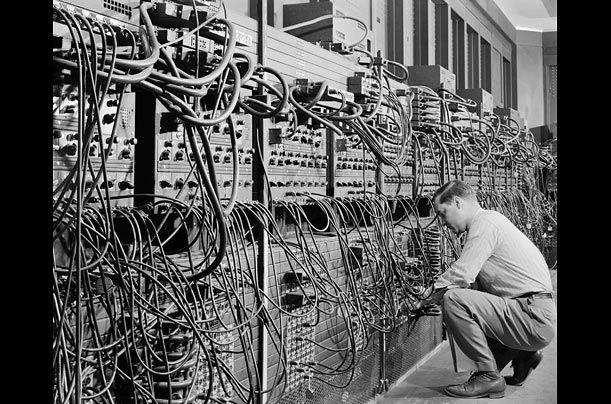
Generation of Computer

Each generation of computer is characterized by a major technological development that fundamentally changed the way computers operate, resulting in increasingly smaller, cheaper, more powerful and more efficient and reliable devices.
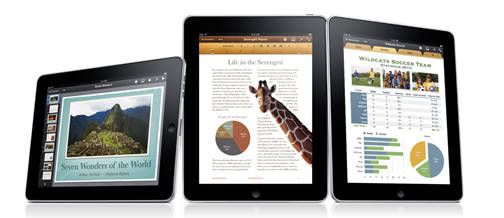
The iPad is one of the hottest gadgets of 2010

The iPad essentially revolutionises the concept of a tablet computer. Previously tablet devices addressed a legitimate consumer need (casual, lazy, couch-bound computing), but left most people frustrated with a stylus-driven handwriting recognition system and an operating system that was really designed to be used on a desktop PC.
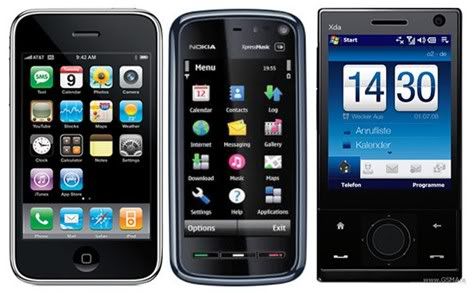
The Technology of Mobile Phone

Mobile phones also support a wide variety of other services such as text messaging, MMS, email, Internet access, short-range wireless communications (infrared, Bluetooth), business applications, gaming and photography. Mobile phones that offer these more general computing capabilities are referred to as smartphones.

The Technology of Internet

The Internet is a global system of interconnected computer networks that use the standard Internet Protocol Suite (TCP/IP) to serve billions of users worldwide.
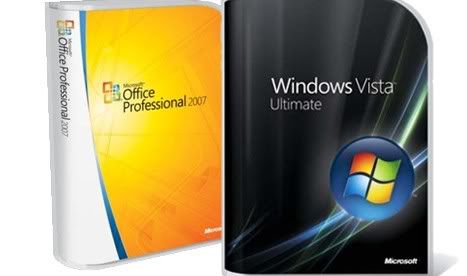
The Categories of Software

Software is often divided into application software (programs that do work users are directly interested in) and system software.

Ethics in Computer


Ethics in using computer


1. Have you ever asked for permission to download materials from the internet such as music, articles, graphic and other material. 


2. If you have, you are following the computer code of conducts. There are many web sites with restriction where the public is allowed to use their material. 


3. Users may have to pay royalty (fee) to the owner or quote the website in their assignment or project, in order to be able to use this material.


4. Examples of ethical computer code of conducts include:


• sending warning about viruses to other computer users

•asking permission before sending any business advertisements to others

using information with authorization


** from Module from BPK - Ethics in Computer

Installing and Uninstalling Application Software


HOW TO INSTALL AND UNINSTALL SOFTWARE


1) Installing Software

Steps you should take before you Install Software.

   · You should run Scan Disk to check the Drive for Errors. Also you may want to check to see if the disk is Fragmented, if it is more then 80%, you should Defragment the drive.

Click the Check Now button-check the Automatically fix system errors-click Start. It will tell you it cannot run now and will run at the next boot, click Ok and restart the computer.
   · Scan Disk and Disk Defragmentor . Go to -Start-Programs-Accessories-System Tools, run Scan Disk first, then run Defragmentor, before you Defrag.

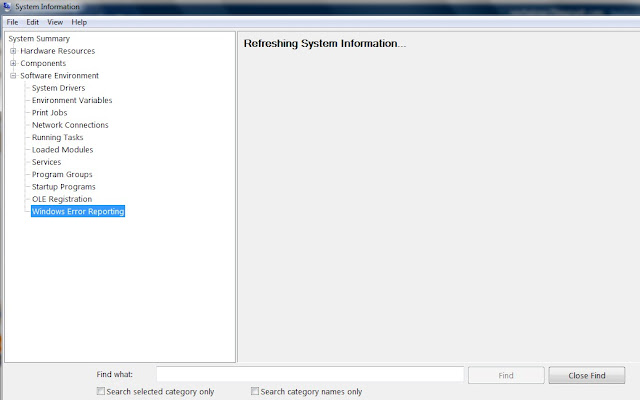
   · It wouldn't hurt to run System File Checker. Start-Programs-Accessories-System Tools-System Information-Software Environment, this is a Windows Utility that scans Windows files for corrupted files, if it finds one it will ask for the Windows Disk or your Restore Disk to fix the file. After you install software, you may want to run this. Installs will sometimes replace Windows files or entries, this utility will restore them the way Windows wants them.


     Leave it like this and Windows will scan to see if any of it's files have been corrupted, if so it will ask you for the Windows install or restore disk , so it can fix the corruption. You can also replace a file if you know which one you need.


   · Turn off any Virus Software you have running in the background.

   · Here is a shut down short cut, press and hold down, Ctrl-Alt-Delete, this will take you to Windows-Close Programs Utility, highlight the virus program and click End Task and wait for a End Task Window to pop up, you may have to do this twice to turn it off. The programs will start up again when you reboot or restart your Computer, you will need to know the name of your Virus program so you know what to disable. Actually you can End Tasks on all those Programs, Except, SysTray and Explorer these run your desktop.

   · Now your ready to Install the software. At present, most of the included CD to install the application software is automatic. You only need to press the next only.


  · After the Install is done, you should Reboot your system, if the program didn't, some do not require you to, but I do, just to be safe.


2) Uninstalling Software


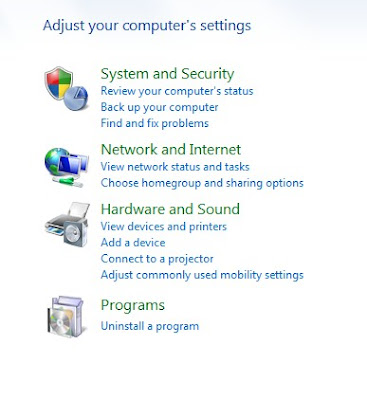
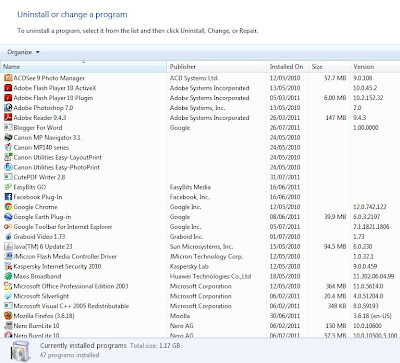
Use the Uninstall a Programs in the Control Panel to uninstall program.


   This is where you Remove Software from your Computer. Click on the Program, you want to Uninstall, Click on the Add/Remove Button. If it ask you if you want to leave some files ( usually .dll files ) click Yes to All button, these can be cleaned up later with Norton WinDoctor ( if you have it ). Some other program may need those files to run properly.

  · Most Good Software Products come with a Uninstall Link. It will be in the Control Panels, Add/Remove Utility, Start--Settings--Control Panel-- Add/Remove Programs, if it isn't in Add/Remove it may be in the Programs Menu under that Programs Name, it will say Uninstall ----. Find the Program in the list Add/Remove, highlight it, click on the Add/Remove button, if it asks you, if you would like to leave shared files usually .dll files, say yes to all, leaving them will not bother anything .Besides the next steps will remove them if they are a problem.

  · Next, assuming there was a Removal Program. Go to Start--Find, type in the name of the Software you uninstalled, delete any entries or folders for that Software, BE careful ! make sure they are that program, I always find files with a programs name, but it belongs to some other Software, usually when you use the Add/Remove Program, if it can't remove a folder or file it will tell you and give you Details of what it left behind write the info down.

  · If the Company did not give you a removal program, use an Uninstall Program like Revo Uninstaller which is free revouninstaller.com.


Cyber Law


What is Cyber Law?


Cyber law refers to any laws relating to protecting the Internet and other online communication technologies.


NEEDS FOR CYBER LAW


- In the recent years, many concerns and issues were raised on the integrity and security of information, legal status of online transactions, privacy and confidentiality of information, intellectual property rights and security of government data placed on the Internet.


- These concerns and issues clearly indicate why cyber laws are needed in online activities.

- The need for cyber law :

1) Integrity and Security of Information

2) Security of Government Data

3) Legal Status of Online Transactions

4) Intelectual Property Rights

5) Privacy and Confidentially of Information


THE CYBER LAW ACTS IN MALAYSIA


- The Malaysian Government has already passed several cyber laws to control and reduce the Internet abuse.


These cyber laws include:

- Digital Signature Act 1997

- Computer Crimes Act 1997

- Telemedicine Act 1997

- Communications and Multimedia Act 1998


Beside these cyber laws, there are three other cyber laws being drafted.

- Private Data Protection Bill

- Electronic Government Activities Bill

- Electronic Transactions Bill


Slide Powerpoint: Important of Cyber Law


Internet Communication


Various form of communication on the internet


1) E-Mailing


- A system for sending and receiving messages electronically over a computer network, as between personal computers.

- A message or messages sent or received by such a system.

- E-Mail is a method of exchanging digital messages from an author to one or more recipients.

- Modern email operates across the Internet or other computer networks. Some early email systems required that the author and the recipient both be online at the same time, in common with instant messaging.

- Today's email systems are based on a store-and-forward model. Email servers accept, forward, deliver and store messages. Neither the users nor their computers are required to be online simultaneously; they need connect only briefly, typically to an email server, for as long as it takes to send or receive messages.


2) Chatting


- Internet chatting involves real-time instant text messaging between two or more users in chat rooms. They are many different types of Internet chats all with different purposes.

- Internet chatting has its advantages and disadvantages; therefore it is important to understand them so that you do not fall victim to predators who would seek to harm you.

- Once a chat has been initiated, either user can enter text by typing on the keyboard and the entered text will appear on the other user's monitor. Most networks and online services offer a chat feature. Example IRC and facebook.

- Internet chat rooms allow you to communicate with different kinds of people from all over the world. They allow you to meet different kinds of people who share similar interests, goals, hobbies and desires.

- Internet chats can also be a great learning center ( e.g. chatting forums) where people can ask questions and receive answers on products and services, computer troubleshooting and more.


3) Video Conference


- A videoconference or video conference (also known as a videoteleconference) is a set of interactive telecommunication technologies which allow two or more locations to interact via two-way video and audio transmissions simultaneously. It has also been called 'visual collaboration' and is a type of groupware.


-Videoconferencing differs from videophone calls in that it's designed to serve a conference rather than individuals. It is an intermediate form of videotelephony, first deployed commercially by AT&T during the early 1970s using their Picturephone technology.


4) Net Meeting


- A product developed by Microsoft Corporation that enables groups to teleconference using the Internet as the transmission medium.

- NetMeeting was bundled as part of Windows and included point-to-point telephony and video calling capability over the Internet as well as multipoint whiteboard and application sharing.

- NetMeeting supports VoIP, chat sessions, a whiteboard, and application sharing. It's built into Microsoft's Internet Explorer Web browser.

- The advent of instant messaging (IM) and other alternatives for online, real-time communication contributed to its demise. Microsoft announced a replacement online meeting service called Office Live Meeting, formerly from PlaceWare, a company Microsoft acquired in 2003.


5) Newsgroup


- A newsgroup is a discussion about a particular subject consisting of notes written to a central Internet site and redistributed through Usenet, a worldwide network of news discussion groups. Usenet uses the Network News Transfer Protocol (NNTP).


- Newsgroups are organized into subject hierarchies, with the first few letters of the newsgroup.


- Discussion group on the Internet as well as a source for MP3 files and images.


- Newsgroups make up the Usenet (user network), which preceded the Web by more than a decade.


- Starting in the late 1970s, newsgroups were message boards for Unix technical issues. However, they continue to prosper alongside Web-based discussion groups called "forums" (see Internet forum).


- Although a topic can be newsworthy, newsgroups have nothing to do with the daily news. Organized into categories, alt (alternative) contains the most diversity (see newsgroup categories).


6) Forum


- An Internet forum, or message board, is an online discussion site where people can hold conversations in the form of posted messages. The forum is the place for people to virtually meet online where they can post messages and respond to each other. These usually are set up to discuss a specific topic (ie. children, computing, HTML).


- They differ from chat rooms in that messages are at least temporarily archived. Also, depending on the access level of a user or the forum set-up, a posted message might need to be approved by a moderator before it becomes visible.


- Forums have a specific set of jargon associated with them; e.g. a single conversation is called a "thread."


- A forum is hierarchical or tree-like in structure: a forum can contain a number of subforums, each of which may have several topics. Within a forum's topic, each new discussion started is called a thread, and can be replied to by as many people as wish to.


- Depending on the forum's settings, users can be anonymous or have to register with the forum and then subsequently log in in order to post messages. On most forums, users do not have to log in to read existing messages.


Peripherals used for communication are :


1) Web Camera

2) Microphone


3) Earphone


Related Posts Plugin for WordPress, Blogger...